Commanding Attention: How to Master the Briar Font for Unforgettable Design
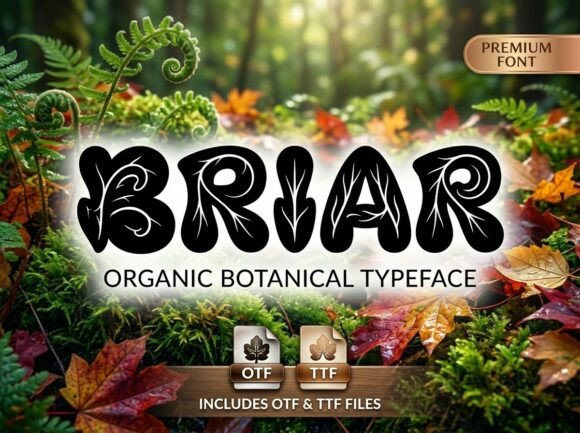
In the crowded landscape of digital typography, where sans-serifs and minimalist scripts dominate, there is a distinct need for typefaces that refuse to whisper. Briar enters this space not as a background player, but as the main character. Described as an avant-garde decorative display font, Briar is engineered to be the focal point of any composition. It possesses a commanding visual personality, characterized by unique artistic flourishes and a strong, artistic soul. However, its high-end, polished finish allows it to bridge the gap between experimental editorial layouts and luxury packaging. Whether you are a freelancer designing a signature logo, a marketer creating high-impact posters, or a small business owner conceptualizing packaging, understanding how to wield this typeface is crucial. It is not merely a tool for writing; it is a tool for shouting, elegantly.
The "All-Caps" Reality: Understanding the DNA of Briar
The most common mistake beginners and even seasoned professionals make with display typefaces like Briar is misunderstanding their structural limitations. A frequent oversight occurs when users attempt to force a conversational tone with this font. It is vital to internalize early on that Briar is an All-Caps, uppercase-only display typeface.
This is not a bug; it is a feature born of intention. By omitting lowercase characters, the creators of Briar have focused entirely on the intricate craftsmanship of every individual letter. Each glyph is designed to act as a standalone work of art. When you purchase or download Briar, you are receiving OTF (OpenType Font) and TTF (TrueType Font) files. The OTF version is particularly important here because it often contains advanced layout features necessary for professional design software, ensuring that your spacing and ligatures behave correctly.
The mistake to avoid here is attempting to use Briar for long-form body copy. Because it is a display font with "commanding visual personality," using it for paragraphs will result in "rivers of white space," uneven kerning, and a severe lack of readability. It is simply not engineered for legibility at small sizes. Instead, reserve Briar for headlines, logos, and single-word social media graphics where its artistic flourishes can breathe.
Avoiding the "Circus Poster" Effect: Context is King
One of the most misunderstood aspects of avant-garde fonts is their versatility. While Briar is suitable for "experimental editorial layouts," applying it to the wrong context can make a design look chaotic rather than high-end. A common pitfall is assuming that "bold" means "busy." If you pair Briar with other heavily stylized fonts or place it on top of visually complex, high-contrast backgrounds, you destroy its polished finish.
Consider a scenario where a freelancer is designing a poster for a local event. They choose Briar for the headline because it looks cool, but they place it over a photograph with high detail and varying light values. The result is a muddy mess where neither the text nor the image is legible. The solution lies in isolation. Briar demands breathing room. When using this font, treat it as a graphic element rather than just text. Give it ample negative space. A better approach is to pair Briar with a clean, geometric sans-serif for the body text and place the Briar headline on a solid color block or a clean, low-opacity overlay.
Technical Precision: Kerning and Tracking Adjustments
Because Briar is characterized by "unique artistic flourishes," the default spacing (kerning) between letters might not always be perfect for every specific combination of characters. A frequent error is accepting the default tracking without adjustment. In high-end design, particularly for luxury packaging or signature logos, optical spacing is more important than mathematical spacing.
If you are designing a logo using Briar, do not simply type the word and hit enter. Switch to the Glyphs panel in your design software (such as Adobe Illustrator or Photoshop). You may find alternate characters or ligatures that improve the flow of the word. Furthermore, look closely at the spacing between letters like 'A' and 'V' or 'T' and 'o'. Avant-garde fonts often have swashes that extend far beyond the standard bounding box. If you do not manually adjust the tracking to visually balance these flourishes, your text will look disjointed. Always zoom in to 200% or 300% to check the optical weight between characters.
File Management and Compatibility Checks
For the creators and entrepreneurs reading this, technical logistics matter. Briar is provided in both OTF and TTF formats. A mistake often made by small business owners is installing the wrong file type for their operating system or software, leading to rendering issues or missing decorative elements.
Always prioritize the OTF (OpenType Font) file if you are using professional design software like the Adobe Creative Suite or Affinity Designer. The OTF format supports more advanced typographic features and is the industry standard. The TTF (TrueType Font) file is your fallback, ensuring universal compatibility across older operating systems or basic office software. However, be aware that if you use Briar in a standard word processor, you will likely lose access to its advanced stylistic sets.
Before finalizing a design, check your export settings. When exporting to PDF or flattening an image, ensure you have embedded the Briar font. If you send a file to a printer or a client without embedding the font, the text may revert to a generic system font, completely ruining the "commanding visual personality" you worked to achieve.
Strategic Application: Where Briar Shines
To get the most value out of Briar, you must align its strengths with your project goals. It is engineered for specific use cases, and deviating from these rarely ends well.
- High-Impact Headlines: Use Briar for the main title of a magazine spread or a website hero section. Its "strong, artistic soul" captures attention instantly.
- Signature Logos: For brands aiming for a boutique, bespoke, or artistic vibe, Briar works beautifully. However, ensure the brand name is short. Long names in an all-caps display font can become unwieldy.
- Conceptual Packaging: If you are designing packaging for artisanal goods, cosmetics, or high-end beverages, Briar adds a touch of luxury. It suggests that the product inside is curated and unique.
- Poster & Social Media Design: In the fast-scroll environment of social media, a static image needs to pop. Briar’s flourishes stop the thumb.
The Final Polish: Elevation over Decoration
The difference between an amateur design and a professional one often lies in restraint. Briar is a powerful tool, but it is not a magic wand. The ultimate goal is to use this typeface to elevate your message, not just to decorate the page. Before you export your final project, ask yourself: Does the font support the message, or is it overpowering it?
By respecting the all-caps nature of the font, manually adjusting the spacing for optical perfection, and pairing it with complementary, understated elements, you transform Briar from a mere download into a strategic asset. It is a typeface for creators who refuse to blend in, but it requires a steady hand and a thoughtful eye to ensure it stands out for the right reasons.