Benatica: Why This Charming Handwritten Font Deserves a Closer Look
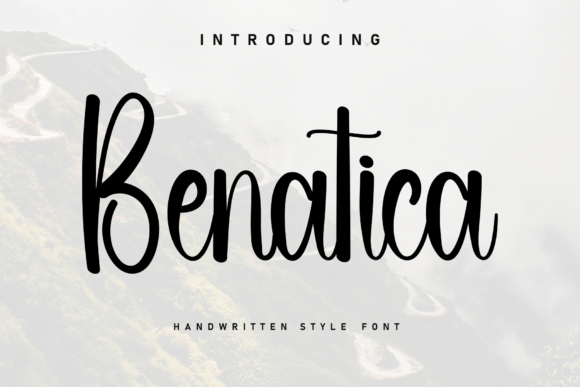
When you first encounter Benatica, it’s easy to be immediately charmed. Its smooth strokes and organic lines create a relaxed, authentic atmosphere that feels genuinely heartfelt. In a digital world often saturated with sterile, geometric typefaces, Benatica offers a breath of fresh air. It’s the kind of font that can make a logo feel more personal, an invitation more intimate, and a social media post more approachable.
However, the very qualities that make Benatica so appealing—its casual, handwritten nature—are also what lead many designers and creators into common pitfalls. Choosing and using a script font like this isn't as straightforward as selecting a standard serif or sans-serif. The difference between a polished, professional result and an amateurish one often lies in understanding a few key details that are easy to overlook.
The Allure and the First Misstep: Assuming It's a Workhorse
The biggest misunderstanding with a font like Benatica is treating it like a universal text font. Its beautiful, flowing script is perfect for headlines, logos, and short, impactful phrases. It excels at evoking emotion and setting a specific tone. Where it stumbles is in the body of a long paragraph. Trying to read 500 words of connected cursive script is not just difficult; it’s frustrating for your audience. This mistake directly impacts usability and communication, potentially driving readers away from your message before they’ve even absorbed it.
A Better Approach: Think of Benatica as your headline artist or accent specialist. Pair it with a highly legible, clean sans-serif font for body text. For example, use Benatica for a wedding invitation's names and date, but set the venue details and RSVP information in a font like Lato or Open Sans. This contrast creates visual interest while ensuring clarity.
Spacing and Sizing: The Devil in the Details
Many beginners download a font like Benatica, type out their text, and call it done. This is where quality and presentation can suffer. Handwritten fonts often have unique spacing—both between individual letters (kerning) and in the overall line (leading). The default settings in your design software may not be optimized for Benatica's specific character shapes.
Letters might collide in awkward ways, or the spacing could feel uneven, disrupting the font's intended flow. Furthermore, using it at too small a size can turn its elegant loops into an indistinguishable blur. This oversight makes your work look sloppy and unprofessional.
Practical Correction: Always manually adjust the tracking (letter-spacing) and leading (line-spacing) after typing your headline. Zoom in and examine the connections between letters. Sometimes, adding a tiny bit of extra space between letters (tracking of +5 to +15) can dramatically improve legibility and aesthetic harmony. Test your chosen size at the intended viewing distance—what looks good on your monitor might be illegible on a mobile screen or a printed flyer.
Context is King: Matching Font to Function
Not every project is a perfect match for Benatica. A common error is forcing a charming, relaxed font into a context that demands formality or high-tech precision. Using it for a corporate law firm's logo, a cybersecurity report, or a medical brochure would create a jarring disconnect. The font's personality would clash with the subject matter, undermining the communication and credibility of the content. This mismatch can confuse your audience and dilute your brand message.
Thoughtful Evaluation: Before you commit, ask: Does the tone of Benatica align with my project's core message? It's a superb choice for lifestyle brands, artisanal products, wedding materials, personal blogs, and creative portfolios. For a bakery, a yoga studio, or a children's book, it’s often perfect. For a bank, a tech startup, or a formal academic paper, it’s likely the wrong tool. The goal is harmony, not just decoration.
Licensing and Technical Hurdles: Beyond the Download
The excitement of finding the perfect font can lead to skipped steps. One critical area is understanding the licensing for Benatica. Is it free for personal use only? Does a commercial license cover all your intended uses, including merchandise or app development? Overlooking this can lead to legal issues and unexpected costs, turning a creative project into a legal headache.
Similarly, technical details like file formats and software compatibility are often ignored until a problem arises. Will it work in your design software? Does it include all the necessary characters and glyphs for your language? These practicalities affect efficiency and can halt a project in its tracks.
Essential Checklist Before You Use Benatica:
- Verify the License: Read the terms carefully. If in doubt, contact the creator. Ensure your use (personal, commercial, print, digital) is covered.
- Test the Full Character Set: Type out all the letters, numbers, and symbols you need. Check for special characters or alternate styles (swashes) that could enhance your design.
- Consider Your Medium: Will it be used on a website (check for web font files like .WOFF), in a video, or for print? Each medium has its own technical requirements.
Embracing Alternatives and Making an Informed Choice
Even if you love Benatica, it’s wise to explore alternatives. The world of handwritten fonts is vast. Some may offer more weight variations (like a bold or light version), better language support, or a slightly different mood—perhaps more energetic or more formal. Comparing a few options ensures you’re choosing the best possible tool for your specific need, not just the first one you liked.
Ultimately, Benatica is a wonderful typeface that, when used with insight and care, can elevate a design from good to genuinely special. Its power lies in its ability to convey warmth and authenticity. By avoiding the common traps of misuse, you ensure that its charm works for you, not against you, resulting in projects that are both beautiful and effectively communicative.