Bunny Cute: A Practical Guide to Using the Easter Bunny Display Font in Your Creative Projects
In the toolkit of any designer, marketer, or creative professional, a font is rarely just a set of letters. It is a critical piece of a larger visual communication puzzle, a tool that conveys tone, evokes emotion, and directs audience perception. The right typeface can transform a simple message into a memorable experience. This is particularly true for seasonal and thematic projects, where the goal is immediate, resonant impact. The Bunny Cute font, specifically the Easter Bunny - Cute Playful Handwritten Display Font, is a specialized asset designed for exactly this purpose. It is not a general-purpose workhorse but a precision tool for injecting whimsy, charm, and a distinctly spring-like personality into targeted creative work.
Understanding the Asset: Beyond Simple Letterforms
Before integrating any new asset into a workflow, a clear understanding of its components and intended use is essential. Bunny Cute is fundamentally a display font, meaning it is engineered for headlines, logos, and short bursts of text where visual impact outweighs long-form readability. Its primary value lies in its two distinct styles, each serving a different function in a design hierarchy.
The Two Styles: A Dual-Purpose Toolset
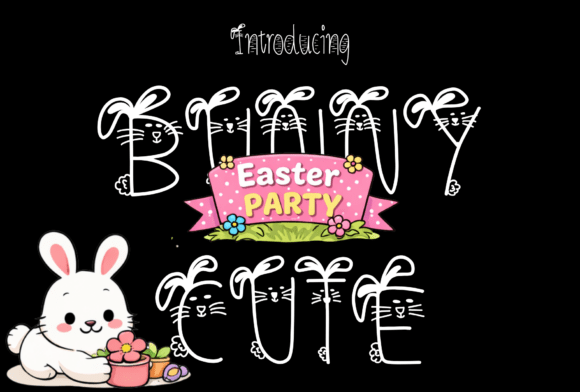
The first style is a unique bunny-themed uppercase set. Each capital letter is decorated with adorable ears, whiskers, or other subtle bunny motifs. This is the font's headline act. Its strength is in creating an immediate, unmistakable thematic connection. Use this style for main titles on invitation cards, feature text on merchandise, or key callouts in social media graphics. It is the visual equivalent of a clear, cheerful greeting. However, its decorative nature means it should be used sparingly. Overuse can lead to visual clutter and dilute its special effect.
The second style is a playful doodle-style lowercase set. This style has a textured, hand-drawn feel that mimics the casual, authentic strokes of a marker or pen. It is more versatile than its uppercase counterpart and is excellent for subtitles, body text in very short paragraphs, or any element that needs to maintain the playful theme without competing with the primary headline. The hand-drawn texture adds warmth and a personal touch, making it ideal for projects aiming for a friendly, approachable, or craft-inspired aesthetic.
Strategic Integration into the Creative Workflow
Effective use of a thematic font like Bunny Cute is a matter of strategic planning, not just aesthetic preference. It fits into a specific phase of the creative process, typically after the core concept and color palette are established, but before final asset creation begins. Its role is to execute the visual theme with precision.
Planning and Asset Selection
Consider the project's goals and audience. Is the deliverable a formal corporate Easter greeting, or a vibrant classroom activity sheet? Bunny Cute excels in contexts targeting families, educators, children, and brands with a playful, nurturing, or festive identity. During the planning phase, decide which elements will be primary and which will be supporting. A common workflow is to pair the decorative Bunny Cute uppercase with a clean, simple sans-serif font for longer descriptions or logistical details. This combination ensures the theme is prominent while maintaining clarity and professionalism for necessary information like dates, times, and locations.
Compatibility and File Preparation
A practical implementation step involves checking compatibility. Bunny Cute is delivered as a standard font file (OTF or TTF), so it installs like any other on both Mac and Windows systems. It is compatible with major design software including Adobe Illustrator, Photoshop, InDesign, and Canva. For entrepreneurs creating merchandise, it is crucial to verify how the font renders in your print-on-demand platform's editor. Always test the font in a mock-up before finalizing a design for production. This quality control step prevents unexpected issues with kerning (letter spacing) or rendering in different environments.
Practical Applications and Workflow Examples
The true test of an asset is its application. Here are concrete ways Bunny Cute can be implemented across various professional and personal projects.
For Educators and Classroom Creators
When designing worksheets, bulletin board headers, or classroom decorations, consistency and engagement are key. Use the uppercase Bunny Cute style for the main topic header—"Spring Math Fun" or "Reading Garden." Use the lowercase doodle style for section titles within the worksheet. This creates a cohesive, themed environment that is visually stimulating for young students without causing distraction. Pair it with simple icons and a limited color palette to maintain a clean, organized look.
For Small Business Owners and Marketers
Easter and spring present seasonal marketing opportunities. For a bakery, use Bunny Cute on a social media graphic announcing a special pastry, pairing the font with high-quality product photography. For an e-commerce store, it can highlight a "Spring Sale" banner. The key is integration with your existing brand assets. If your brand colors are pastel, the font will blend seamlessly. If your brand is more minimalist, use the font as a single, high-impact headline against a clean background to let the theme speak without overwhelming your core identity. This approach maintains brand consistency while leveraging timely appeal.
For Event Planners and Freelance Designers
Creating custom invitations, menus, or party favors is a direct use case. The workflow here is about customization. Design the main invitation layout with the uppercase Bunny Cute font for the guest of honor's name or the event title. Use the lowercase style for the party details. A pro tip is to convert the text to outlines in your design software before sending to print. This eliminates font compatibility issues at the print shop, ensuring your design looks exactly as intended. The font also works well for creating custom stickers or tags for party favors, adding a personalized, handcrafted element that clients value.
Considerations for Long-Term Use and Quality Control
Like any specialized tool, Bunny Cute has a specific shelf life in terms of relevance. Its peak utility is during the spring season, particularly around Easter. Therefore, organization is paramount. Create a dedicated "Seasonal Assets" folder in your design library. After the season, archive the project files. This keeps your active workspace uncluttered and makes it easy to retrieve the assets for next year's projects, saving significant planning time.
Quality control involves more than just technical checks. It requires a critical eye for design balance. Does the whimsical font clash with a serious tone in another part of the layout? Is the text legible at the intended size? Always print a test sample or view the design at 100% zoom to assess readability and overall harmony. Remember, the goal of using Bunny Cute is to enhance communication, not hinder it with illegibility.
Ultimately, Bunny Cute is a focused creative resource. Its value is unlocked through thoughtful planning, strategic pairing with complementary fonts and design elements, and careful execution within a defined workflow. By understanding its strengths and limitations, professionals and hobbyists alike can use it to efficiently produce charming, effective designs that resonate with their audience and bring a touch of springtime magic to their projects.