Exult: Making Bold Design Choices Without Common Pitfalls
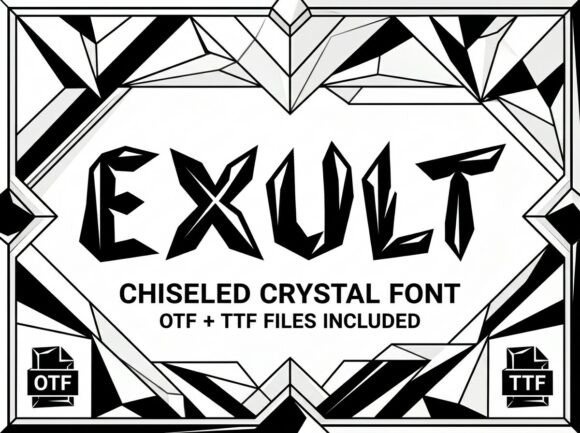
When you first encounter the Exult font, its striking personality is immediately apparent. This decorative display typeface is crafted to command attention, offering unique artistic elements that break away from the mundane. For designers, entrepreneurs, and creators looking to inject a strong visual identity into their work, Exult presents an intriguing option. It promises to transform ordinary headlines, logos, and packaging into something memorable. However, the excitement surrounding a visually powerful font can sometimes lead to oversight in its practical application. Understanding its specific nature is key to harnessing its power effectively and avoiding frustrating setbacks in your creative process.
The All-Caps Reality: A Crucial Detail Often Missed
The single most important characteristic of Exult, and one frequently overlooked in the initial rush of discovery, is that it is an ALL-CAPS ONLY typeface. This is not a minor feature; it is the font's fundamental design principle. Exult contains no lowercase letters whatsoever. Every glyph is designed as a decorative uppercase character, intended for high-impact situations where uniform height and bold form are paramount. The misunderstanding often occurs when users skim descriptions, assuming "uppercase" means the font includes both cases but favors capitals. This assumption can halt a project in its tracks when you suddenly need a flowing sentence for body text or a nuanced phrase where lowercase would soften the tone.
The impact of this oversight is significant. Imagine designing an elegant invitation or a detailed product label. You select Exult for its flair, only to discover midway through that your carefully worded message cannot be typed in the mixed-case format you envisioned. The result is wasted time, a forced redesign, or a compromised layout that uses Exult only for the title and a completely different font for the rest, potentially clashing with the intended aesthetic. To avoid this, always verify the font's character set before purchasing or integrating it into a major project. Look for the "Glyphs" panel in your design software preview or check the font specimen sheet provided by the seller. A quick test by typing a full alphabet can save hours of rework.
Matching the Font to the Project's Purpose
Exult shines in specific contexts: bold headlines, artistic logos, and creative packaging. Its strong visual personality is an asset here, creating immediate recognition and emotional impact. A common mistake, however, is applying it where clarity and readability at small sizes are critical. Using Exult for lengthy paragraphs, fine print, or technical information is like using a spotlight to read a book—it's overwhelming and counterproductive. The decorative details that make each letter a "work of art" can blur together at smaller point sizes, reducing legibility and frustrating your audience.
Consider a scenario where a small business owner uses Exult for their website's main navigation menu. While it looks dramatic on a large monitor, on a mobile screen, the intricate letterforms might become difficult to parse quickly, harming user experience. A better approach is to reserve Exult for elements where its artistry can be fully appreciated: the primary logo mark, a hero section headline, or the title on a product box. For supporting text, pair it with a clean, simple sans-serif or serif font that ensures readability. This creates a balanced hierarchy where Exult provides the excitement, and the secondary font delivers the necessary information clearly.
Evaluating Technical Compatibility and Workflow
The availability of Exult in both OTF (OpenType Font) and TTF (TrueType Font) formats is a professional plus. The OTF file is ideal for advanced design software like Adobe Illustrator or InDesign, offering superior typographic features and smoother curves. The TTF ensures universal compatibility across devices and applications, which is essential if your designs will be used by clients or colleagues with varying software. A frequent oversight is not considering the end use of your design files. If you create a logo in a program that only embeds TTF fonts and send it to a printer who requires outlined vectors or specific OTF features, compatibility issues can arise, leading to delays or unexpected font substitutions.
Before starting, check your design software's font handling capabilities and discuss file formats with any collaborators or service providers. For instance, if you're designing a logo for a client, ensure you understand how they will use it. Will it be embedded in a Word document? Used on a website? Printed on merchandise? This foresight allows you to prepare the files correctly—outlining text for print, providing web font formats, or specifying the exact font version needed. It’s a simple step that prevents communication breakdowns and ensures your creative vision is preserved across all applications.
Making an Informed Decision: Beyond the Aesthetic
Choosing a typeface like Exult should be a deliberate decision, not just an emotional one. While its artistic appeal is compelling, practical evaluation is necessary. Test the font with your actual content. Does it work with the specific words in your brand name? Some letter combinations in decorative fonts can create awkward spacing or unintended shapes. Download any available trial version or use the seller's preview tool to type out your key phrases.
Furthermore, consider the long-term versatility of your investment. Exult is a specialist. It excels in its niche but won't serve as your all-purpose workhorse font. This is perfectly fine, as long as you plan your typographic system accordingly. Budget and design for a complementary font family for your body copy and other UI elements. By viewing Exult as a powerful accent within a broader toolkit, you make a smarter purchase and create more cohesive, professional designs. It’s about building a system that works, where each element, including a standout font like Exult, plays its intended role without compromise.
In the end, fonts like Exult offer tremendous creative potential. They allow you to craft messages that are not just read but felt. By approaching such tools with a clear understanding of their strengths and limitations—by heeding the all-caps warning, matching them to the right project, and considering the technical workflow—you empower yourself to make bold design choices that are both beautiful and effective. You move beyond simply using a font to strategically deploying a design asset that truly helps your work stand out.