Mastering Efren: How to Use This Bold Display Font Without the Common Pitfalls
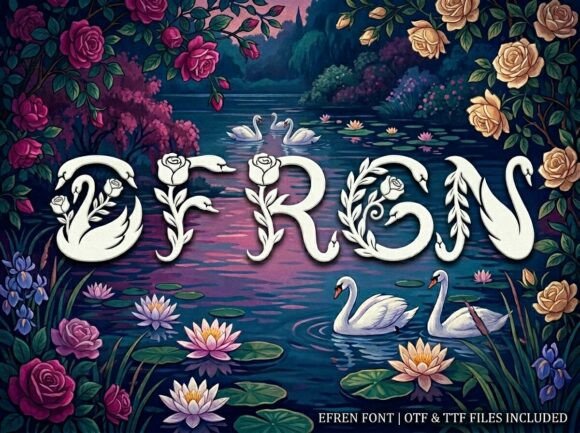
When you first encounter Efren, the reaction is usually instant. It is a stunning decorative display font, designed specifically to be the center of attention. With its unique artistic elements and strong visual personality, it offers a break from the ordinary, safe typography that saturates the market. Whether you are a freelancer designing a logo, a small business owner creating packaging, or a marketer crafting a bold headline, Efren promises a professional and polished finish that commands respect. However, the jump from "liking a font" to "using a font effectively" is where many creators stumble.
The issue isn't the quality of the design—Efren is built with high-impact visuals in mind—but rather the misunderstanding of what a "display typeface" actually demands from a layout. Many users purchase the OTF and TTF files, excited to implement them, only to find that their designs look cluttered or illegible. This usually happens because the rules of engagement for a font like Efren are completely different from those of a standard body typeface like Arial or Helvetica. If you want to avoid a messy presentation and truly harness the power of this font, you need to navigate a few specific challenges.
The "All-Caps" Trap: Why Legibility Suffers
The most immediate detail that users overlook—and the one that causes the most frustration—is the structural nature of the font. Efren is an ALL-CAPS uppercase-only display typeface. It does not include lowercase letters. This is a crucial distinction that affects how you structure your copy. A common mistake beginners make is attempting to type a long sentence or a full paragraph in Efren, hoping the artistic style will carry the weight of the message.
This approach almost always fails. Display fonts like Efren are designed for "high-impact" moments: a three-word headline, a single initial, or a short brand name. When you string together a full sentence in all-uppercase decorative letters, you destroy the "word shape" that helps the human eye read quickly. Instead of seeing a message, the viewer sees a wall of complex shapes.
The Better Approach: Treat Efren as a spice, not the main course. Use it for the primary hook—your H1 headline or the logo mark. For the supporting text, switch to a clean, neutral sans-serif or serif font. This contrast not only makes the design readable but actually makes the Efren letters pop more by giving them breathing room.
Spacing and Layout: The Art of Letting Breathe
Another frequent misstep involves tracking and kerning. Because Efren features "unique artistic elements," the letters often have intricate shapes that extend beyond the standard bounding box of a typical font. If you place these letters too close together, the details will collide, turning your elegant headline into an unreadable blur.
I have seen designs where the user forced the font into a tight container, resulting in a crowded, amateurish look. This undermines the "professional and polished finish" the font was designed to provide. Furthermore, because it is a display font, it often requires manual kerning adjustments—something many beginners forget to check.
Practical Advice: Always err on the side of generosity with spacing when using Efren. In your design software (whether using the OTF or TTF file), increase the tracking slightly. This allows the decorative flourishes of each letterform to stand out individually. Think of it like hanging art in a gallery; you need white space around the frame for the eye to appreciate the work. If you are working on a logo, take the time to manually adjust the kerning between specific letter pairs to ensure optical balance.
File Formats and Software Compatibility
It is also vital to understand the tools you are using. You will receive OTF (OpenType Font) and TTF (TrueType Font) files. A common confusion is not knowing which to install. The OTF file is the professional standard; it allows for more advanced typographic features and is generally preferred for layout software like Adobe Illustrator or InDesign. The TTF file is the standard for universal compatibility, ensuring the font works on almost any device or basic editing software.
A mistake users often make is installing the TTF on a high-end design system, potentially limiting themselves to advanced features, or trying to use the OTF on a very old system that might struggle with rendering.
Checklist Before You Install:
- Identify your software: If you are using professional design suites, prioritize the OTF file.
- Check your OS: For general compatibility across all devices or web use, the TTF file is your safest bet.
- Restart your apps: A classic oversight is installing the font and not seeing it in the dropdown menu simply because the software was open during installation. Always restart your program after adding new fonts.
Context is King: Matching Font to Medium
Finally, consider the medium. Efren is versatile enough for bold headlines, artistic logos, and creative packaging. However, "versatile" does not mean "universal." Using this font for a legal disclaimer, a medical instruction manual, or a dense blog post would be a severe error in judgment. The artistic elements that make it beautiful for a poster would make it exhausting to read in a long-form context.
Before you commit to using Efren for a project, ask yourself: Is this text meant to be read quickly for information, or is it meant to be admired for style?