Amstrong Project: Integrating Industrial Grit into Your Design Workflow
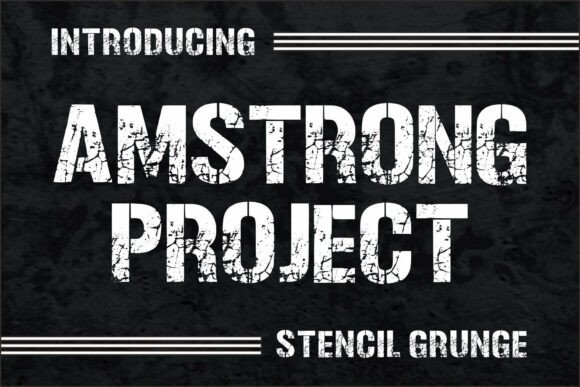
In the landscape of digital design, the choice of typography is rarely a mere aesthetic decision; it is a strategic implementation of tone and context. When a project demands a shift away from clean, sterile minimalism toward something with weight and history, the Amstrong Project font becomes a critical asset in the designer’s toolkit. This bold stencil-style display typeface is not just a collection of letters; it is a textural element that communicates ruggedness, durability, and an unpolished reality. Understanding how to integrate a distressed, industrial font like Amstrong Project into a modern workflow requires a nuanced approach to planning, execution, and quality control.
Understanding the Visual Language of Industrial Typography
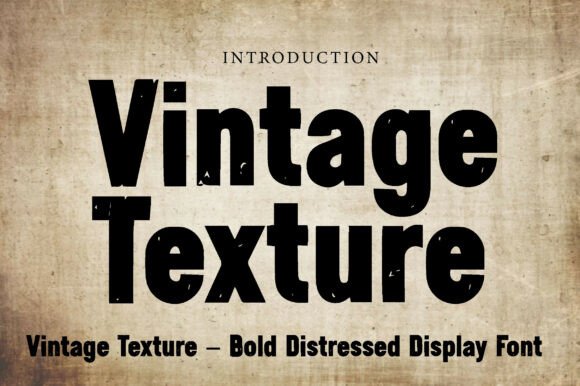
Before selecting a typeface, professionals must analyze the psychological requirements of the deliverable. The Amstrong Project falls into a specific category of display typography designed to evoke a "lived-in" atmosphere. Its stencil construction suggests military precision or logistical necessity, while the distressed grunge texture implies exposure to the elements—rust, paint, and concrete. This combination makes it a powerful tool for projects that aim for a vintage, urban, or military-inspired aesthetic.
However, integrating such a distinct style requires careful planning. Unlike neutral sans-serifs that blend into the background, a font with this level of character demands center stage. It is best suited for headlines, logos, and branding elements where impact is the primary goal. Using it for body text would compromise legibility, so the workflow must account for pairing it with a highly readable secondary font for longer copy. This pairing process is the first step in the implementation phase, ensuring that the "grit" of the primary font is balanced by the clarity of the supporting text.
Pre-Production: Strategic Planning for High-Impact Assets
The integration of the Amstrong Project begins long before the first keystroke is typed in the design software. It starts with the discovery phase of a project. For designers and branding specialists, this involves identifying the core attributes of the client’s message. If the brief calls for "sleek" or "corporate," this font is likely the wrong tool. However, if the brief calls for "authentic," "raw," or "resilient," Amstrong Project becomes a prime candidate.
During the planning stage, it is helpful to gather mood boards that feature industrial textures—concrete walls, metal signage, and vintage machinery. This visual context helps the designer understand the environment in which the font naturally exists. By establishing this context early, you prevent the common mistake of forcing a grunge aesthetic into a setting that requires polish. The goal is to create a cohesive visual narrative where the typography supports the imagery, rather than clashing with it.
File Preparation and Asset Management
Effective workflow relies on organization. When sourcing a font like Amstrong Project, it is vital to manage the font files correctly within your system. This includes ensuring the font is installed correctly across all workstations if working within a team. Inconsistencies in font rendering can derail a project timeline. Furthermore, for print projects, outlining the fonts in vector software (like Adobe Illustrator) is a necessary step in the final preparation to avoid font-missing errors during production. This technical rigor ensures that the artistic intent survives the transition from screen to physical media.
Execution: Applying the Aesthetic in Real-Time
Once the planning is complete and the asset is ready, the execution phase involves applying the Amstrong Project to the design canvas. This is where the "stencil" nature of the font comes into play. Because the characters are designed to look like they have been sprayed through a template, they often work best when they are not perfectly aligned or when they overlap with background textures.
Layering and Texture Integration
A practical tip for using this font is to treat it as a texture rather than just text. In software like Photoshop, designers can rasterize the text layer and use blending modes (such as Multiply or Overlay) to allow the underlying background texture to show through the letters. This creates a cohesive look where the typography appears painted onto the surface. For example, placing the Amstrong Project text over a concrete wall texture and setting the blending mode to "Multiply" will instantly create a realistic stencil effect, grounding the digital design in a physical reality.
Alternatively, in vector workflows, the distressed edges of the font provide enough visual interest that heavy effects are often unnecessary. The font does the heavy lifting of adding "wear and tear." This saves time during the production process, as designers do not need to manually add grunge overlays or distressing filters to the text. The asset is ready to go, streamlining the path from concept to completion.
Contextual Application: Use Cases and Workflows
The versatility of the Amstrong Project allows it to fit into various professional workflows, from corporate branding to personal creative projects.
Branding and Marketing Collateral
For entrepreneurs and small business owners, particularly those in the fitness, craft brewing, or outdoor adventure sectors, this font offers a distinct brand voice. It signals that the brand is tough and established. When creating marketing collateral—such as posters, banners, or social media graphics—using Amstrong Project for the call-to-action (CTA) can increase visibility. The bold, blocky nature of the stencil letters cuts through the noise of a busy feed, drawing the eye immediately to the message.
Publishing and Editorial Design
Publishers and bloggers can utilize this typeface for book covers or article headers, specifically for genres like thriller, military history, or dystopian fiction. The aesthetic immediately sets the genre expectation for the reader. In an editorial workflow, the font can be used for pull quotes or section breaks to add visual rhythm to a page layout. It breaks the monotony of standard serif body text, providing a visual anchor that keeps the reader engaged.
Product Packaging and Merchandise
For those involved in product design, the Amstrong Project is highly effective for merchandise like t-shirts, tote bags, and stickers. The distressed nature of the font means it translates exceptionally well to screen printing and embroidery, where "perfect" edges are often difficult to achieve anyway. The font’s inherent imperfections hide minor production variances, making it a practical choice for manufacturing. This compatibility with production techniques is a crucial factor in the decision-making process for merchandise creators.
Quality Control and Long-Term Usability
As with any design element, quality control is essential. When using a high-character font like Amstrong Project, it is easy to overdo it. A common pitfall is using the font for every piece of text in a layout, which can make the design look cluttered and illegible. The implementation rule of thumb is hierarchy: use the bold, distressed font for the primary message, and a clean, neutral font for the supporting information. This contrast creates a professional balance.
Furthermore, consider the longevity of the design. While trends in grunge and industrial design come and go, the specific "stencil" look has a timeless association with utility and strength. To ensure long-term use, designers should avoid pairing the font with overly trendy effects that might date the work quickly. Instead, let the natural texture of the Amstrong Project speak for itself. A clean layout with ample whitespace often makes the distressed texture pop more effectively than a cluttered background.
Conclusion: The Role of Texture in Modern Design
Integrating the Amstrong Project into a design workflow is about more than just selecting a font from a dropdown menu; it is about adopting a specific visual dialect. It requires a shift in how one approaches layout, layering, and hierarchy. By treating the font as a textural asset and planning its implementation carefully, professionals can leverage its rugged, industrial feel to create designs that are not only visually striking but also deeply communicative. Whether used for a bold headline, a branded logo, or a piece of merchandise, this typeface provides the tools necessary to build a visual presence that is strong, edgy, and undeniably impactful.